Appearance
Dojo Zones
Dojo Zones adds higher-timeframe setup monitoring to Coin-Sniffer. Each published zone has a direction, an area to watch, an entry, a stop, three targets and a recorded lifecycle.
Plans cover 1D, 5D and 1W. New zones are normally checked daily; they are not generated every time the price changes. A symbol may have no qualifying setup for an extended period.
Find and open a setup
- Open Dojo Zones in the app.
- Start with Live, or choose Closed or All.
- Filter by timeframe and direction, or search for a symbol.
- Click a row to expand its plan and display its levels on the chart.
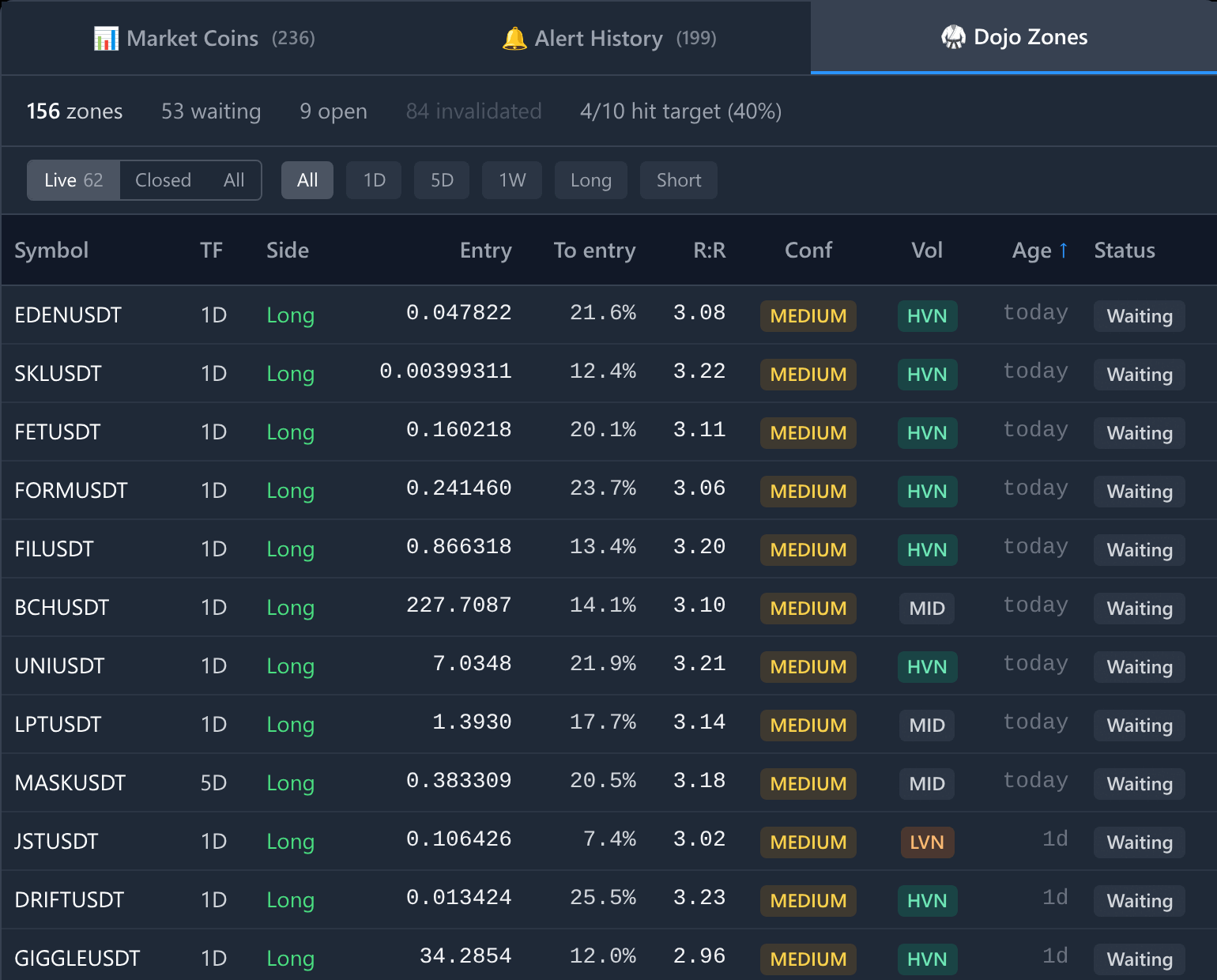
The summary counts every plan matching the timeframe and direction filters. The Live, Closed and All views change which rows are listed below it.
The chart opens on 1D even for a 5D or 1W setup. The TF column describes the plan's timeframe.
Read the plan
| Field | Meaning |
|---|---|
| Side | The plan's long or short direction. |
| Zone | The price area associated with the setup. |
| Entry | The reference limit-entry price inside the zone. Coin-Sniffer does not place this order. |
| To entry | Distance from the latest available price to entry. If no live price is available, the app uses the price when the zone was published and marks that value with a tooltip. |
| Stop | The plan's invalidation price. The percentage beside it is entry-to-stop distance, not your account risk or a guarantee of an execution price. |
| Targets | TP1, TP2 and TP3 reference prices. |
| R:R | The plan's reward-to-risk ratio to TP1. It does not include your trading costs or prove profitability. |
| Conf | A relative confluence label: HIGH, MEDIUM or LOW. It is not a win probability. |
| Vol | Volume context: HVN, LVN or a neutral label. A dash means unavailable, not zero volume. Pro and admin accounts only — the column is not shown on other plans. |
| Age | Time since publication. |
| Price when armed | The historical price when the plan was published. |
Expand the row for details that may be hidden in a narrow table. Backed by lists the supporting context displayed for the plan.
What Pro adds
Backed by, the Volume line and Point of control describe how a zone was arrived at, and are shown to Pro and admin accounts. Trial accounts do not include them.
Everything else in the plan is on every subscription: the zone, entry, stop, three targets, R:R, age, status and the Conf rating. Conf tells you how strongly the zone was rated; the fields above are what it was rated on. Where they are not available the expanded plan says so rather than leaving a blank.
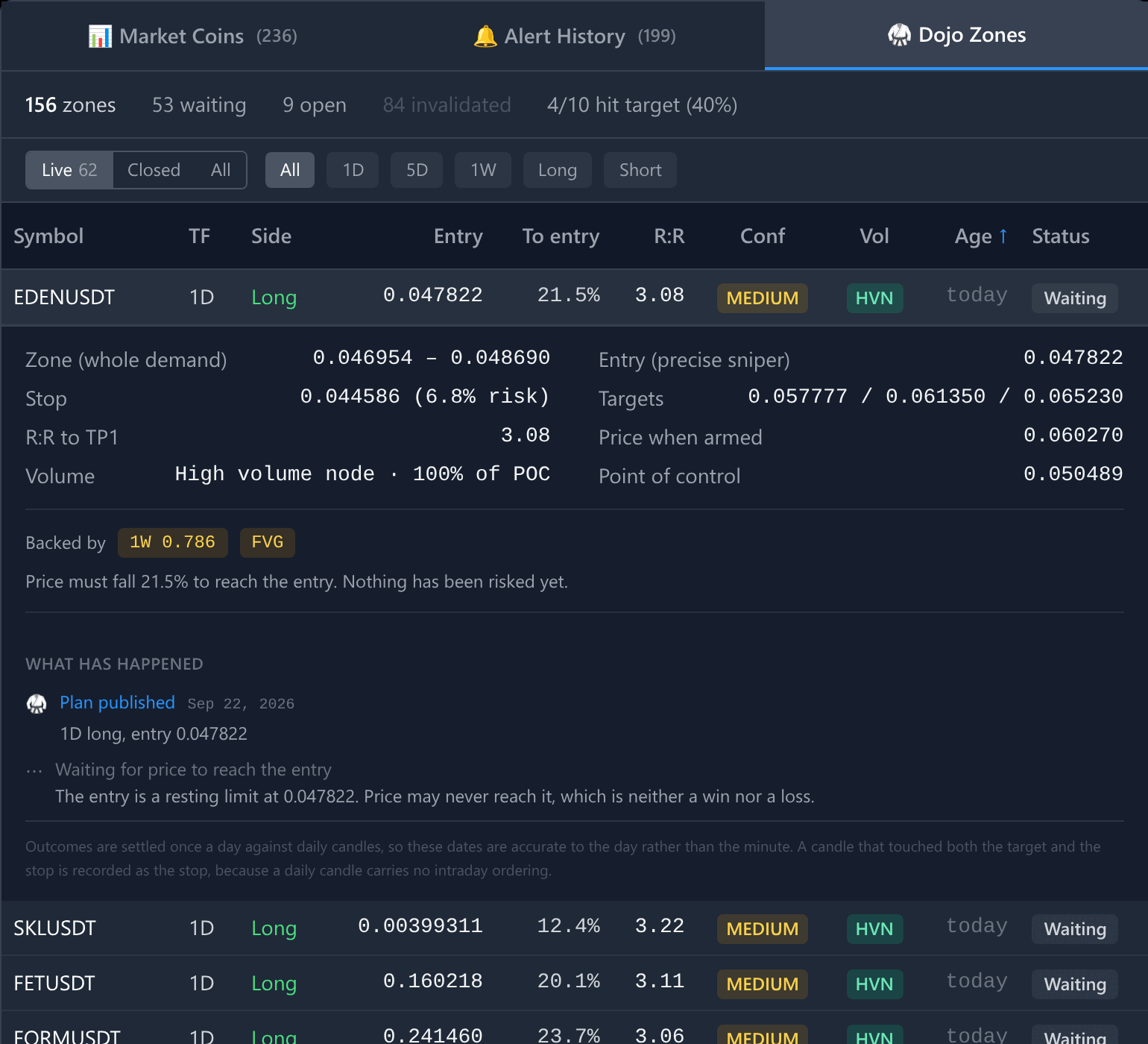
The expanded plan, as a Pro account sees it. Backed by names the context the zone was published on — here a weekly fibonacci level and a fair value gap.
HVN indicates an area with relatively concentrated trading activity; LVN indicates a thinner area. Point of control, where shown, is a reference price associated with the greatest volume concentration. These labels describe context, not a promised reaction. Both are part of the Pro fields described above.
Understand status
| Status | Meaning |
|---|---|
| Waiting | The recorded entry has not been reached and the setup remains active. |
| Open | Entry has been recorded as reached; no final target/stop outcome is recorded yet. |
| Target | TP1 has been recorded as reached. This does not mean TP2 and TP3 were reached. |
| Stopped | The stop has been recorded as reached. |
| Invalid | The setup became invalid before a recorded entry. No trade is counted. |
Live includes Waiting and Open. Closed includes Target, Stopped and Invalid. All combines them within the history loaded by the app.
Why a zone is invalidated
An invalidated zone was retired before price ever reached the entry, so no trade is counted either way. The recorded reason is shown with the plan:
| Reason | Meaning |
|---|---|
| Leg reanchored | A new swing confirmed, so the levels were measured from bars that no longer define the move. |
| FVG mitigated | The fair value gap that validated the zone has been filled. |
| Structure flipped | Recorded market structure no longer agrees with the plan's direction. |
| No current leg | The symbol no longer produces a usable leg in that direction. |
| Expired | Structurally intact, but old enough that the plan is no longer treated as active. |
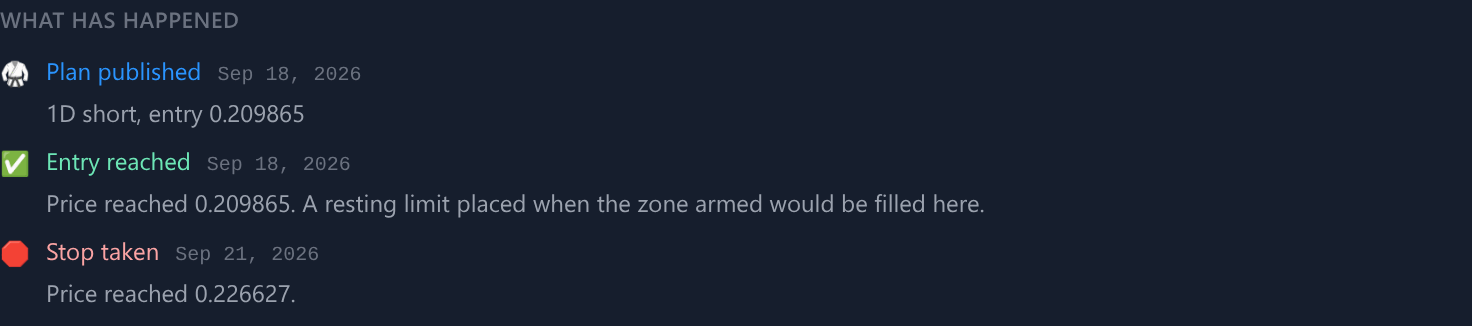
A zone retired before price reached it. The timeline names the reason rather than recording a loss.
An invalidated plan is not a loss. It is a plan that stopped being one; any resting order you placed on it is yours to cancel.
Zone alerts are different events
A plan reports its whole life, not only its publication:
- Dojo OTZ Long/Short 1D, 5D or 1W: a new zone was published.
- Dojo Zone Entered: price reached the zone area; it may not have reached the exact entry.
- Dojo Entry Filled: observed price reached the plan's entry.
- Dojo Target Reached (Long/Short): the first target was recorded as reached from a filled entry. It does not describe TP2 or TP3.
- Dojo Stop Taken (Long/Short): the stop was recorded as reached from a filled entry.
- Dojo Zone Invalidated (Long/Short): the zone was retired before the entry was ever reached, with a recorded reason. No trade is counted.
A price move can reach the exact entry without a separate earlier zone-entered notification. Choose the published, zone-entered and entry-filled events you want under Settings → Alert Rules.
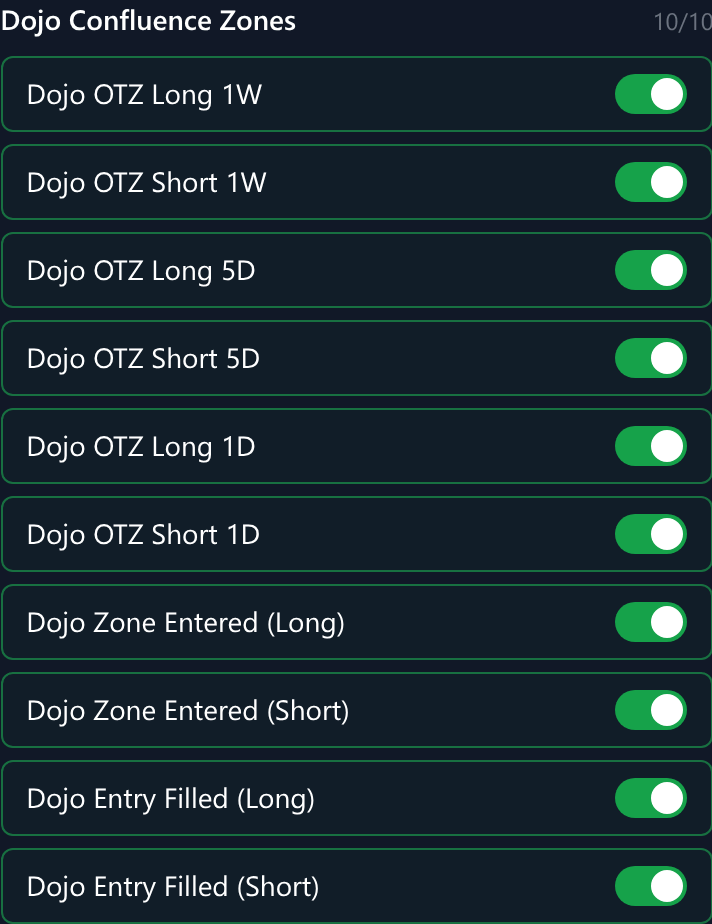
The zone events you can switch on and off.
The three closing events — target, stop and invalidation — are delivered without a separate toggle in that list. They follow plans you have already been told about rather than adding new coins to watch.
“Filled” is a market observation, not confirmation of your exchange order. The app cannot see your orders, balances, position size or actual fills. A target or stop event describes the modelled plan, not your position, size or realised result.
Select a Dojo alert to open the exact plan it refers to, rather than only the coin.
Follow one plan
Expand a plan to see What has happened: publication, entry reached, first target, stop, or invalidation, each with the date it was recorded.
- A step that has not happened is shown as still open, not as failed. A zone price never reached is neither a win nor a loss.
- A running trade is normally settled within minutes of the touch. An outcome that the minute check missed is settled by the daily pass instead and is dated to the day, so treat a date as the moment of record rather than an exact execution time.
- Where a single candle touched both the target and the stop, the record uses the stop. A candle carries no ordering inside itself, and resolving it the other way would flatter every outcome drawn from it.
The open plan is kept in the page address as a setup parameter, so it survives a refresh and the link can be shared with someone who has access. A plan that cannot be found is reported as missing; the app does not substitute another plan. That matters because one symbol often carries both a long and a short on different timeframes, and those are different plans with different levels.
Closing the chart clears the selected plan and removes it from the address.
Plans in Alert History
Alert History shows a Dojo line for any coin with a plan worth knowing about:
| Chip | Source | Meaning |
|---|---|---|
| Waiting | The plan record | Published, price has not reached the entry. |
| In trade | The plan record | The entry was recorded as reached and the plan is running to its target or stop. |
| Target reached, Stop taken, Invalidated | Recent alerts | The plan ended recently enough to appear in the alert window. |
Each chip names the plan's timeframe and direction, and opens that exact plan. Beyond four chips the rest are counted as +N more rather than dropped; open Dojo Zones to see them all.
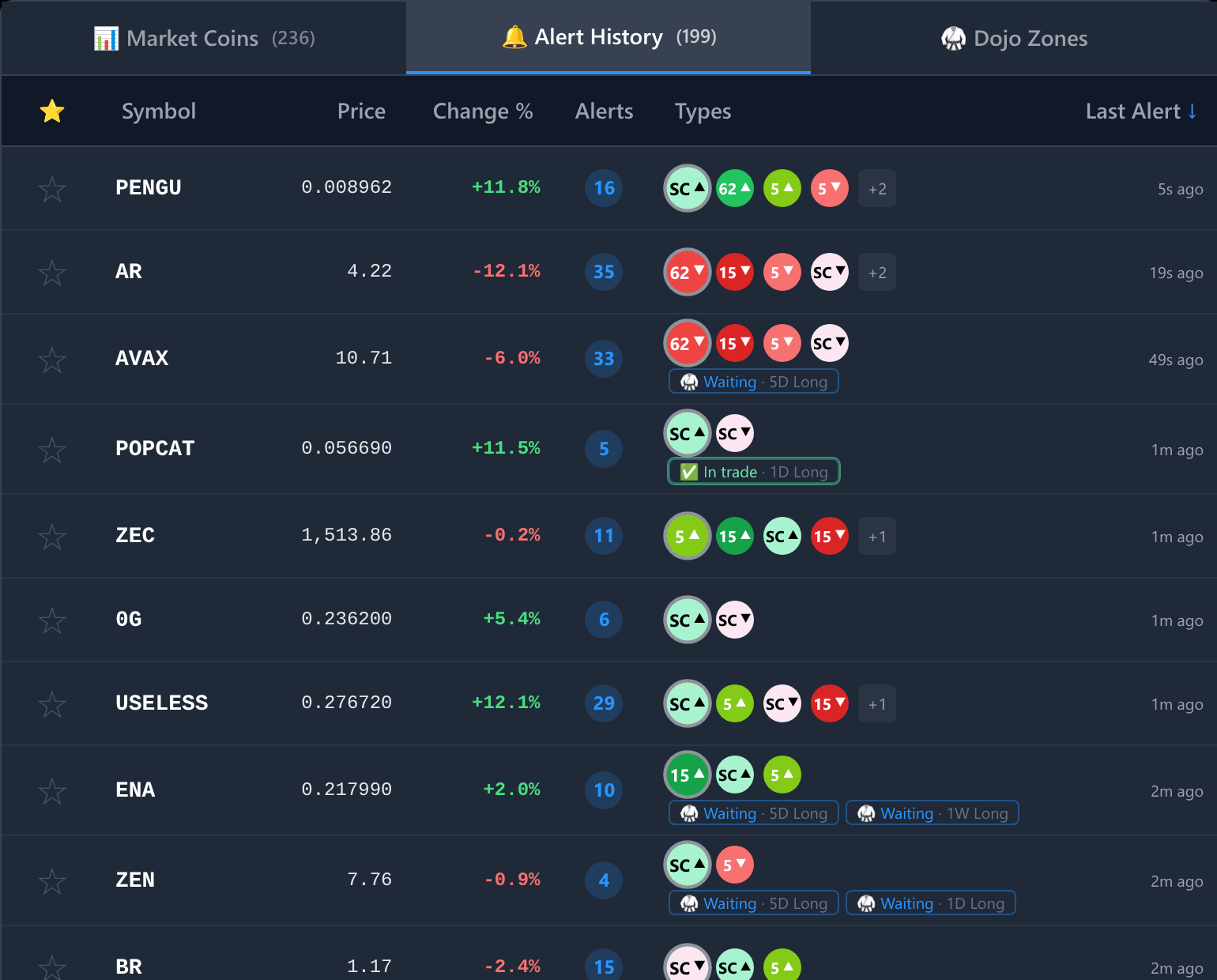
Plan chips sit on their own line under the round alert badges. A coin can carry more than one plan.
These chips are separate from the round alert badges beside them. An alert badge records that something fired in the recent alert window; a plan chip is current state and stays for as long as the plan is in play, which for a weekly zone can be months.
A coin with a live plan but no alerts in the recent window still gets a row. Its count reads – (plan only on mobile) instead of a number, because nothing fired, and its time comes from the plan's own latest recorded moment.
Outcomes and timing
Prices, arrival alerts and recorded outcomes do not all update together, and the table refreshes periodically. A recent touch may therefore appear before the recorded status changes.
Once a plan's entry has been reached, its target and stop are checked every minute against minute candles, so a trade that ends intraday is normally recorded and announced the same day rather than the next. A daily pass still replays the full candle history behind it. That pass is the backstop: if minute data was missing for a symbol, or the move is older than the recent window, the outcome is recorded later instead of never.
A zone that has not yet been reached is a different case. It stays Waiting until price arrives, however long that takes, and it can be retired as Invalid in the meantime.
Neither check can see the order of moves inside a single candle. Where one candle touches both stop and target, the record uses the conservative stopped outcome. This holds at both resolutions, though a one-minute candle containing both levels is rarer than a daily one.
The summary counts every recorded setup matching the current timeframe and direction filters, not only the rows loaded in the table below. Its target percentage counts Target versus Stopped setups; Waiting, Open and Invalid setups are excluded, since no trade was won or lost. The Live / Closed / All view and a symbol search change which rows are visible, not the summary. While the counts are still loading the summary reads counting zones… rather than showing zeros.
This is a record of modelled setup outcomes, not a complete account return, execution audit or guarantee of future results.
A coin disappeared from Market Coins
A published zone can outlive the coin's inclusion in the current market list. Select its row in Dojo Zones to inspect it. If the price or chart appears stale, report the symbol and timeframe rather than assuming the plan is updating normally.